






Load balancing Everpure FlashBlade
Updated on November 5, 2026
•
Published on November 5, 2026
Benefits of load balancing Everpure FlashBlade
Load balancing Everpure (Pure Storage) FlashBlade—whether natively across its internal blade architecture or via external/global server load balancers (GSLB) across multiple clusters and endpoints—delivers three core benefits:
- Linear, non-disruptive scalability: As unstructured data demands grow, load balancing abstracts underlying hardware complexity. New blades, chassis, or secondary FlashBlade clusters can be added to the environment dynamically. The load balancer integrates the newly added capacity and compute resources into the active pool immediately, scaling capacity and processing power linearly without requiring client-side reconfigurations or downtime.
- Elimination of hotspots and maximized parallel throughput: FlashBlade is built on a massively parallel, ‘distribute-everything’ architecture. Load balancing automatically spreads client I/O requests (NFS, SMB, and S3 APIs) evenly across all compute blades, data virtual IPs (VIPs), and internal paths. This prevents any individual controller, CPU node, or network path from becoming a performance bottleneck, ensuring predictable low latency and line-rate multi-gigabyte throughput under massive concurrency.
- High Availability and seamless failover: Load balancers monitor the real-time health of storage interfaces, blades, and multi-chassis clusters. If a node, network link, or entire cluster experiences an outage or scheduled maintenance, traffic is automatically steered to healthy resources without dropping client sessions or corrupting transactions. This removes single points of failure and guarantees uninterrupted uptime for mission-critical applications and data pipelines.
About Everpure FlashBlade
Everpure FlashBlade (formerly known as Pure Storage) is unified, all-flash unstructured data storage that
scales with you. It is a single, scale-out file and object storage array that scales effortlessly, with no performance
drops, complex tuning, or downtime.
Why Loadbalancer.org for Everpure FlashBlade?
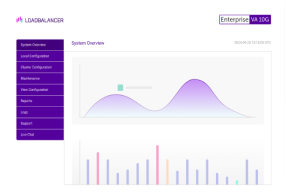
Loadbalancer’s intuitive Enterprise Application Delivery Controller (ADC) is designed to save time and money with a clever, not complex, WebUI.
Easily configure, deploy, manage, and maintain our Enterprise load balancer, reducing complexity and the risk of human error. For a difference you can see in just minutes.
And with WAF and GSLB included straight out-of-the-box, there’s no hidden costs, so the prices you see on our website are fully transparent.
More on what’s possible with Loadbalancer.org.
How to load balance Everpure FlashBlade
The load balancer can be deployed in four fundamental ways: Layer 4 DR mode, Layer 4 NAT mode, Layer 4 SNAT mode, and Layer 7 Reverse Proxy (Layer 7 SNAT mode).
For Everpure FlashBlade, Layer 7 Reverse Proxy mode is recommended.
Virtual service (VIP) requirements
To provide load balancing and HA for Everpure FlashBlade//S, the following VIP is required at each site:
| Ref. | VIP Name | Mode | Port(s) | Persistence Mode | Health Check |
|---|---|---|---|---|---|
| VIP 1 | FlashBladeVIP | Layer 7 Reverse Proxy (TCP) | 443 | None | Connect to Port |
Load balancing deployment concept
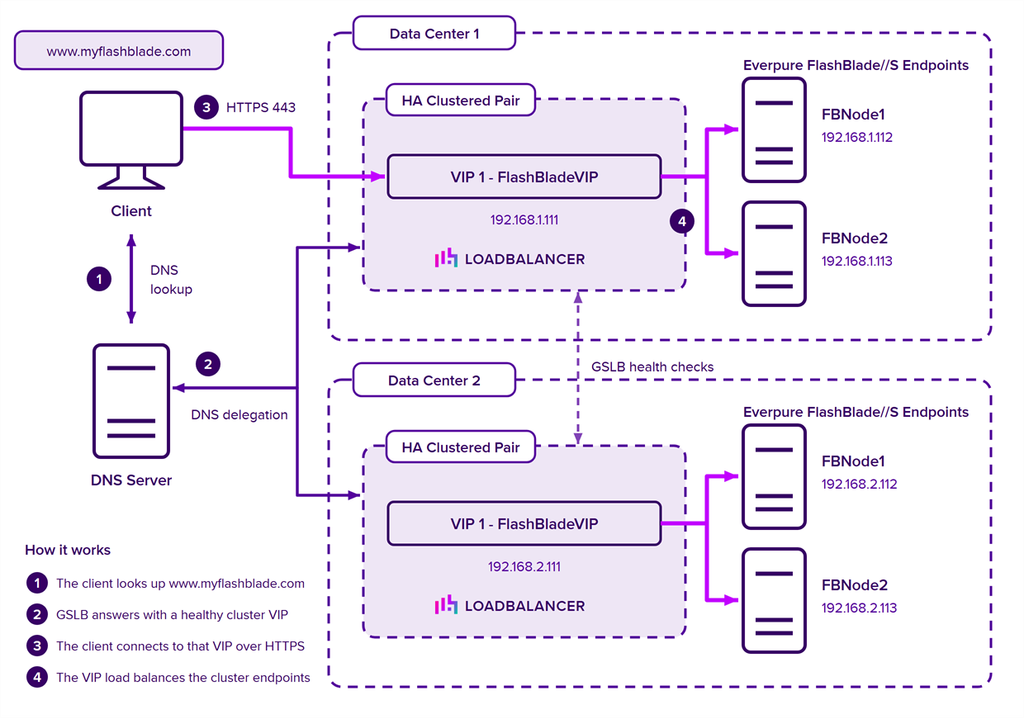
Once the load balancer is deployed, clients connect to the Virtual Services (VIPs) rather than connecting directly
to one of the FlashBlade//S endpoints. These connections are then load balanced across the FlashBlade//S
cluster to distribute the load according to the load balancing algorithm selected. GSLB determines which site’s VIP a client is given in the first place.
About Layer 7 Reverse Proxy load balancing
Layer 7 Reverse Proxy uses a proxy (HAProxy) at the application layer. Inbound requests are terminated on the load balancer and HAProxy generates a new corresponding request to the chosen Real Server. As a result, Layer 7 is typically not as fast as the Layer 4 methods. Layer 7 is typically chosen when either enhanced options such as SSL termination, cookie based persistence, URL rewriting, header insertion/deletion etc. are required, or when the network topology prohibits the use of the Layer 4 methods. The image below shows an example network diagram for this mode.
The image below shows an example Layer 7 Reverse Proxy network diagram:
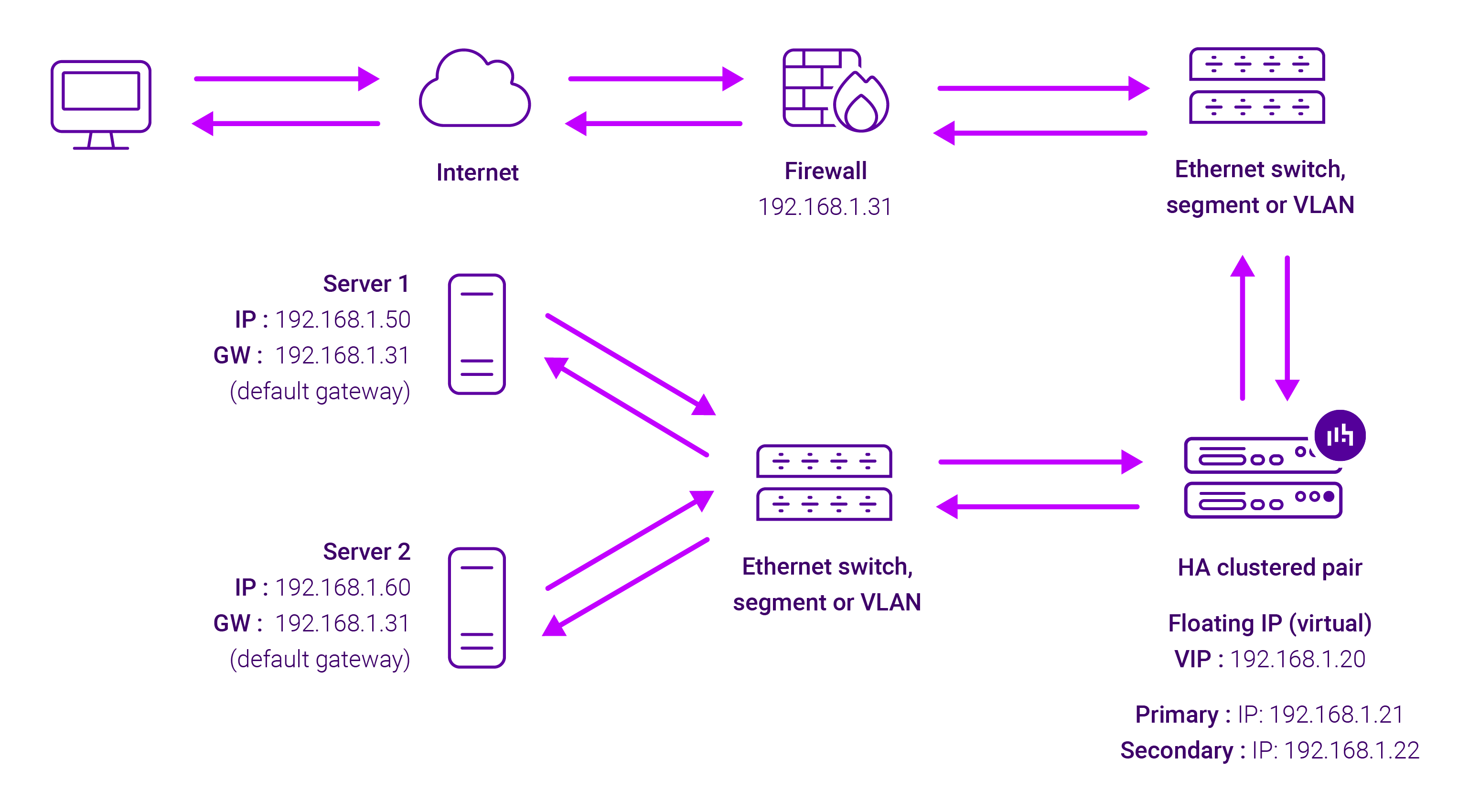
Because Layer 7 Reverse Proxy is a full proxy, Real Servers in the cluster can be on any accessible network including across the Internet or WAN.
Layer 7 Reverse Proxy is not transparent by default, i.e. the Real Servers will not see the source IP address of the client, they will see the load balancer’s own IP address by default, or any other local appliance IP address if preferred (e.g. the VIP address).
This can be configured per Layer 7 VIP. If required, the load balancer can be configured to provide the actual client IP address to the Real Servers in 2 ways. Either by inserting a header that contains the client’s source IP address, or by modifying the Source Address field of the IP packets and replacing the IP address of the load balancer with the IP address of the client. For more information on these methods, please refer to Transparency at Layer 7 in the Enterprise Admin Manual.